Sunday, 5 June 2011

13 Facebook Applications To Promote Your Blog


There are ways to frequent your blogs visibility within Facebook network. Do bear in mind you don’t have to use ALL of them or keep your Wall busy with all the blog updates especially if you are a productive daily-blog-poster. It may get a little annoyed and your friends may secretly switch off your news feedreminder so be smart on picking the ones that suit your network.

Basic Features:

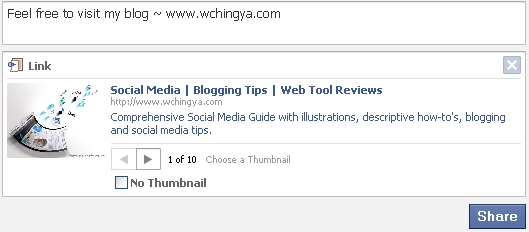
1. Links & Updates
Facebook link & updates
- Share your blog / post link with your friends to have them feedback or comment on it. Or easier, announce an update to have them all aware of the blog launch. Just a snap!
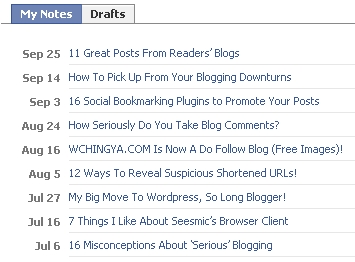
notes
- Copy and paste your individual blog articles or import the entire blog feed into Notes so your friends can read them, either through link sharing or by tagging them. They can spread the notes on your behalf or comment on it as well. The notes can be viewed in Full or Compact (shown in pic) mode.

Blog/Posts Exposures via Additional Applications:
Facebook fan page
Facebook Fan Pages can be a good idea for blog promoting when:
a. You plan to keep your personal Facebook account separated from your blogging community.
b. You can have discussion board, customized applications while sending email updates to ALL fans, as I like to call them supporters instead.
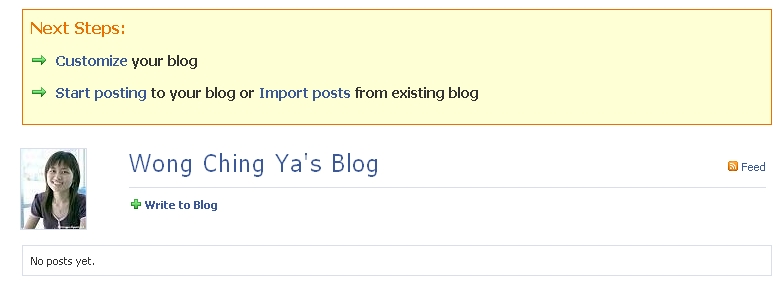
I have just setup my blogs Facebook Page. Hope to see you guys there!

Suggested Read: you may be interested in 16 Facebook Applications to Boost Popularity of Facebook Fan Page
.
networkedblogs
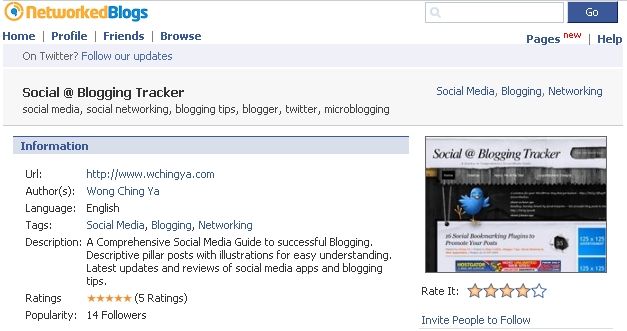
- The most-used application to promote your blog on Facebook with the ability to network with other blogs easily through follow option. Followers can post comment, rate the blog and enjoy meeting other followers. Not to mention it equips the ability to autopost from multiple blogs to your Facebook Pagetoo! I had my Social @ Blogging Tracker all fixed up in NetworkedBlogs. It all be a privilege to see you there!
You can have your networked blogs visible at the sidebar, underneath your Facebook Profile or on your Facebook Pages. Displaying yours and other blogs you have joined or liked, served as an active blogroll apart from blog promotion.
Social RSS
- Provide RSS feed subscription for your blog through Facebook. Make yourSocial RSS visible by setting it appeared as box tab or at the sidebar. Tag the RSS with a familiar name like blog so others will notice. Configure and fill up the required fields before activate it. The feeds will update automatically in accordance to your latest post.
add to info
Add To Info
add to profile
Add To Facebook Profile
- Display your latest or chosen posts with or without graphic on your Facebook Profile (box tab or sidebar) or on Facebook Page. Normally latest posts will be displayed on your Facebook Wall as well if you preset it. Visibility is what Simplaris Blogcast do best, however the updating is quite slow sometimes and require manually setup (free version).

Indirect Methods:

7. Blog
Blog
- How about a little indirect method to promote your main site via Blog on Facebook? This application allows you to blog directly on Facebook by unmark the private option you can make the post public in Explore section to whoever is using the application. Extra audiences, why not? An idea I picked up from those who are using Tumblr and Posterous to promote their main blog.
setting
- The efficiency of writing a post on Blog Box (similar to no.7: Blog) or import from your existing blog. If for the latter, it will update every 6 hours checking for new post on your main site. Unless you prefer to spend some dime on Pro version that may save time on the updating, for me thats unnecessary. Blog Box is said to be visible outside Facebook too, so people can add your blog to Google Reader freely.
compared with pro
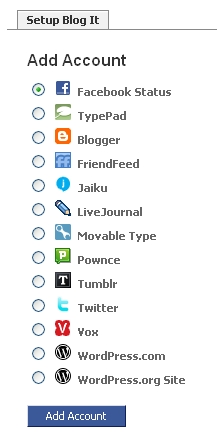
setup Blog It
- Ability to inter-posting between your social media sites and Facebook. Choices ranging from microblogging to various types of blogging platforms. I am more into using it for microblogging instead of blog posts but thats just the matter of preferences. Some similarities shown as Mirror Blog application.
Tumblelog setting
- The ability to display content from your Tumblr blog on your Facebook profile. If you own a Tumblr blog this application is worth a shot.

Extra Facebook Features:

- Create a group that you are passionate about and have like-minded people to join in. Have on-going and active discussions, connect with members often. You may even find some new members interested in your writings too.
- If you are willing to pay for publicity, another idea is via Facebook Ads. You can create a campaign to drive in traffic to your website or your well-known Facebook Page and more. The idea of reaching out to targeted readers varied by age, location, interests is what Facebook Ads do best.
13. Social Media Integration
- Ever since Facebook has decided to open up and willing to integrate with other social media and microblogging sites, sharing a blog post or promotion has never been easier. Through a well-written post you can gain massive exposure on Facebook when blog readers submit your post to:  Digg, Stumbleupon, Delicious, Twitter and have it shown on their Facebook Wall ! As you have noticed I have tried a few on my Facebook, along with LinkedIn account info and Twitter updates:
LinkedIn Profile

16+ Facebook Tips You Don’t Want to Miss!


#1 To Control Facebook Font Size for Readability


To enlarge: Press ‘Ctrl’ and ‘+’;
To minimize: Press ‘Ctrl’ & ‘-’

#2 To Bold and Underline your text in Facebook Chat


For Bold text –> *your message*
For Underline –> _your message_

#3 To Bypass 420 characters limit for Status Updates


Add a photo to your status update and enjoy the limit-free characters.
(Suggestion: use photo that is related to what you’re sharing, see here for the example)

#4 To Increase the number of Pages or Friends to appear in News Feed


At News Feed > Most Recent > Scroll down to bottom, click Edit Options > Increase the maximum number of friends (or pages) shown in Live Feed OR, insert your own selections of ‘Recommended Friends (or Pages)’.
If you are a page admin, encourage your fans to add your page. But mind you, ‘popularity’ is another major factor that you need to be aware of: Facebook News Feed Settings – Random or Not, Biggest Secrets Revealed

#5 To Display extra Information on Facebook Page Wall with ‘Founded’


Go to Edit Page -> Basic Information -> Founded -> type not more than 247 characters for your (extra) business info.

#6 To Access your Application Settings directly from profile


We all know the Account -> Application Settings is no longer available. But you can still reach the application page easily via this direct link:http://www.facebook.com/settings/?tab=applications Bookmark it if you’ll use it often.

#7 To Review your Invites and Imported Contacts


Invite History is an important link to track contacts you had invited to join Facebook. As an admin, I find this particularly useful when I’m sending email invitations to those who are yet to own a facebook profile but to co-administer my page. That way I can track their responses and send reminder to them if need to. Also, a good way to discover if the invited contacts are all set with a personal profile to be added as friends:

#8 To Remove all your Imported Contacts from Phone or Emails


If you’re a mobile user who had accidentally imported your friends from phone contacts or emails while authorizing an app, remove and protect their privacy (and yours) via this link so they won’t be exposed on Edit Friends -> Phonebook:

#9 Discover Facebook Pages to ‘Like’


Browse facebook pages you may find interest in based on categories or countries. Not only that, you can even discover what your friends and you have in common based in mutual ‘liked’ pages.

#10 To Browse Directory by Name


A full directory that contains public search listings on facebook – profiles, pages, applications, groups, you name it – all arranged alphabetically by last name. Numbers 1 to 26 contain non-Latin character names. If you do not wish to be found here, make sure to opt out by changing your privacy settings forPublic Search.

#11 Download Your Facebook Information


A new feature introduced by facebook to back-up your personal data:
Go to Account -> Account Settings -> Download -> Learn More
It will take some time for facebook to generate all your data (photos, videos, wall posts, messages, friend lists etc). Once it is archived (in .zip format), you will receive an email notification to proceed with the download.
Your .zip files will not be containing photos uploaded by others, phonebook and friends’ email addresses, so if you’re in need of those data too, some recommended apps to download the missing data.

#12 To Secure your facebook account


To be notified when people hacked into your facebook account:
Account Settings -> Account Security -> ON -> Save to receive notifications for login alert via email from new devices. You can now login and register your computer with a name, then start tracking.

#13 To Download Facebook Videos


It is always easy to download a video hosted on Youtube, but what about those clips uploaded directly to facebook? This facebook video downloadermay be able to do the trick. So far it has been working well for all public videos.
download facebook video

#14 To obtain facebook Info & Facts:


facebook stories

#15 To Get Practical with your Facebook Page:


  • Enhance your facebook pages with Facebook applications, but be selective.
  • Import blog feed to facebook page for site visibility.
  • Improve admin and fans interactions with contact forms; setup page notifications for wall updates and discussion board.
  • Improve profile- or page-to-page engagements with status tagging
  • Secure your Employer Link with business page link on personal profile
  • Protect your personal profile from business pages with privacy settings
  • Social media integrations with selective tweetsstatus updates schedulers (with points to ponder) and multiple blogs import.

NEW! #16 To Change your Page Name


Great news for newly created facebook pages or business pages that havea small amount of fans, you can now edit your page name from: Edit Page -> Basic Information -> Name
Not all facebook pages are given this previlege and unsure how ‘few’ fans considered eligible for the name-change. But at least it’s a big step for facebook.

The Facebook Marketing Toolbox: 100 Tools and Tips to Tap the Facebook Customer Base


Why Facebook?
Why has Facebook become the go-to networking site for marketers? Check out these articles to read up on the rise of this networking giant.
  1. Inside Facebook: This blog is devoted to "tracking Facebook and the Facebook Platform." You'll find useful stats, marketing tips and more.
  2. Facebook's Ads Page: This page explains how Facebook provides business owners with self-service solutions, market-research solutions and integrated solutions when it comes to advertising.
  3. Should You Advertise on Facebook?: This article helps U.K.-based businesses decide whether or not they should advertise on Facebook.
  4. The Value of Facebook: Even in its earlier days, Facebook was considered a hot commodity in the industry. This post uncovers why there's good reason for all the hype.
  5. What's the Big Deal About Facebook's Social Ads?: This article discusses why Facebook's social ads are such a hit.
  6. $240 Million! Think of All the Beer We Can Buy!: When Microsoft shows a $240 million interest in your company, you know you've made it. Advertisers will also want to take note.
  7. Why Is Facebook Suddenly So Popular Among We Geezers?: A CNET blogger wonders how Facebook's popularity has stretched from its original base of the under-25 crowd.
  8. Ten Reasons Why Facebook Is So Popular: This tongue-in-cheek article explains exactly why Facebook is such a popular site.
  9. How Did Facebook Become So Popular?: This blogger tracks Facebook's rise to social-networking stardom and its technique of "utilizing one of the most powerful viral marketing strategies ever conceived."
  10. Facebook: More Popular Than Porn: Time magazine's Web site discovers that Facebook is more popular than porn sites among college students.
  11. Fifteen Reasons Facebook May Be Worth $15 Billion: Back when Microsoft decided to invest $240 million in Facebook, it also declared the social-networking site to be worth around $15 billion total. The reasons for the site's popularity still hold true in 2008.
  12. The Impact of Facebook's Platform: This article from ReadWriteWeb compares Facebook founder Mark Zuckerberg to a young Steve Jobs and applauds Facebook for opening up its company to developers and advertisers.
Advertising
Learn about current and future advertising opportunities on Facebook by reading these posts.
  1. Sponsored Groups: Sponsor your own group on Facebook by purchasing a link that hosts ad content, message boards and more.
  2. Mini-Feed: When it first came out, members weren't sure if they wanted to be updated each time a friend added new photos, changed their status or even wrote on someone else's Wall. As an advertiser, though, you can track your Mini-Feed to find out what your friends have been up to and more closely study your target audience.
  3. AceBucks: Facebook users earn AceBucks by playing games and taking surveys, then cashing them in for real-life prizes like Wii systems and iPods. Create your own survey or game to promote your business, then invite others to play.
  4. Five Moneymaking Opportunities on Facebook: Mashable! lists several moneymaking strategies available on Facebook, advertising and otherwise.
  5. Facebook's Secret Rate Card: This article explores which Facebook advertising methods are worth your money and effort, and which aren't.
  6. Could Facebook Change Web Advertising?: Listen to this NPR (National Public Radio) report to uncover the newest trends in Web advertising.
  7. How to Effectively Advertise on Facebook: Trendcatching's post explores some of the more lucrative strategies advertisers have used to tap into the Facebook market.
  8. How Does Facebook Figure into Your Online Advertising Campaign?: This article is a must-read for business owners who are thinking about incorporating Facebook marketing into their own advertising campaigns.
  9. Social Networks Find Ways to Monetize User Data: Learn how to make money off of your Facebook friends (it's not as sleazy as it sounds) with the tips and analyses provided here.
  10. Digging into Facebook's Ad Future: CNET News.com believes that Facebook has the capabilities to become an "advertiser's paradise," despite some social-networking sites' inability to make serious profits.
  11. Promote Your Cause on Facebook in Six Easy Steps: TechSoup shows nonprofits how to use Facebook for self-promotion.
  12. Facebook Ads: Facebook's official advertising page strives to prove how social ads, profile pages and paid ads can increase a company's business.
Free Marketing Opportunities
The beauty of using Facebook as a marketing tool comes from the endless ways in which you can advertise your business for free. Once you've set up a free account, use your creativity to maximize these features.
  1. Profile Page: All Facebook members get their own profile page when they sign up. Use this as your canvas to upload pictures, logos and other information about your company.
  2. Groups: Use the site's Groups feature to network with your target audience. You can join existing groups or create one just for your business to amp up the buzz about its services.
  3. Facebook Marketplace: College kids use the site's Marketplace to scout out used couches and find roommates, but a savvy business owner can advertise services and product sales, as well as search for new employees.
  4. Networks: Ignoring the Networks question when you create your company's profile could lose it a lot of business. List your business's city, industry, neighborhood and any other relevant information to let potential customers and business partners know where they can find you.
  5. Facebook Badge: Facebook describes its Badge feature as "a customizable way to share your Facebook information on other Web sites." Creating your own Badge will link Facebook friends to your company's Web site.
  6. Events: Instead of printing out flyers and mailers the next time you want to advertise an event, use the free Facebook Events app to get the word out.
  7. FunWall: Mass emails are so yesteryear. If you want to keep in close contact with your Facebook friends, use the FunWall to create a message or send a greeting to everyone at once.
  8. Top Friends Network: Reward your top friends by sending them a virtual drink or writing on their FunWalls. As a marketing tool, the Top Friends network serves as another way to group your contacts, keep an eye on your target demographic, and quickly and effectively reach out to your company's best customers.
  9. Inbox: Send secure, private messages to your clients on Facebook with the Inbox app. You can still send out mass messages, but only to the contacts you select.
  10. Notes: Mashable! calls Facebook's Notes application a blogging feature because of the way users post links, messages, photos and other information that they want to share with friends. Even if you maintain a blog elsewhere, give your Facebook friends an exclusive peek into your company's news and behind-the-scenes schedule by posting here.
  11. Contact Importer: The contact importer helps you "find your friends on Facebook." If you want to find out if your clients or other work-related contacts use Facebook but think it's a little lame to come right out and ask, upload your contacts from AIM, Gmail, Outlook, Apple Mail and more to find out if they're online.
  12. Share Partners: When you publish updates to your company blog or Web site, add the link or a link and a photo to your Facebook profile using the Share Partners app.
Tools and Applications
Facebook add-ons allow you to customize your profile page and build up virtual relationships with clients and customers. Check out these tools and applications that will give your marketing plan a boost.
  1. Facebook Social Ads: Pinpoint your company's Facebook friends and friend wannabes by creating a social ad that reveals itself to visitors of your profile and friends of friends of friends ... you get the idea.
  2. Facebook Pages: A more business-savvy name for Profile, the Facebook Page now includes all kinds of add-ons so that you can post videos, logos, pictures and other marketing info.
  3. Facebook Polls: Businesses can effectively find out what their target audiences are thinking by utilizing this polling service on Facebook.
  4. Facebook Beacon: Connect your company's Web site to your customers' Facebook profiles with the Beacon action alerts. By integrating just three lines of code, your customers can choose to let their friends see what they viewed and bought on your company's Web site and more.
  5. Facebook Insights: Through charts and mapping devices, companies can accurately track their "presence and promotion on Facebook."
  6. Facebook Platform: If you want stand out from the thousands of other Facebook advertisers, create your own tools and applications with Platform. This system helps Facebook users design interactive apps so that visitors and friends can easily explore what your company has to offer.
  7. FeedBurner: Advertise your company's blog or podcast with the FeedBurner app for Facebook. A feed will appear on your profile, so visitors to your page are instantly updated with new postings, videos and more.
  8. Gydget: Small companies, bands, nonprofit groups and other organizations should try out Gydget, "a stand-alone viral-promotions tool" that you can add to your Facebook page and also encourage others to integrate with their own pages Update fans and clients with details about upcoming events, networking opportunities, sales and product launches.
  9. Ether: Charge by the phone call when you list your Ether number on Facebook with this ingenious app. By adding the button to your Facebook page, you can advertise your expertise and invite friends to call you for advice.
  10. Jobster: Attract new talent from the Facebook pool by integrating a Jobster button with your profile. Your company can build its own job network, submit a listing in the Jobster network and more.
  11. QOOP: QOOP helps you create promotional items like T-shirts and mugs from digital photos. Facebook users can use the QOOP app to share the items by letting friends view and purchase your marketing creations.
  12. Oodle Classifieds: Organize your company's advertisements, job postings and classifieds on Facebook with the Oodle app.
Targeting the Right Demographic
Before you decide to tackle the entire Facebook market, try narrowing down your strategy by researching each of Facebook's demographics.
  1. Big Brands and Facebook: Demographics, Case Studies and Best Practices: This slideshow from Forrester breaks down Facebook's primary demographics by age, country and other dividers to give advertisers insight into effective marketing campaigns.
  2. Facebook Polls Launches Tonight: Marketing Research Paradise: This article details the ways in which Facebook's Polls app can help your company get in touch with its target demographic.
  3. Could Facebook Become the New MySpace: Many have speculated over the relationship between Facebook and MySpace.com, and this article explores the specific demographics of each.
  4. Facebook by the Numbers: This article is from May 2007, but readers can still use the post as a guide to study Facebook's age demographics.
  5. Facebook Users Up 89 Percent Over Last Year; Demographic Shift: Find out how Facebook's overall demographic has changed from its inception to today.
  6. Facebook's Most Popular Apps So Far: Want to know where to slip in ads and find your company's audience? Find out which apps people are using the most on Facebook.
  7. Facebook Goes Beyond College, High School Markets: Even if your company's target audience isn't made up of college students, Facebook is still a viable marketing platform. This article explains why.
  8. Facebook Market Research Secrets: Discover the sneaky way to perform market research by using Facebook's tools.
  9. Facebook: The Future of Market Research?: This market research analysis holds that "sites [like Facebook] are providing useful business solutions not only to advertisers, but also to market research companies and marketing services companies." Read the whole article to find out why.
  10. Facebook Provides Fascinating Glimpse Into Society, Media Demographics: This analysis of Facebook's advertisers also gives tips on how to look for marketing clues from your target audience.
  11. Social-Networking Demographics: This article tracks the general demographic stats of social networking sites like Facebook.
  12. Exercise for the Reader: Facebook Member Stats: The author of this post decided "to pull together some stats on relative numbers of members from each country." Find out the results by reading the entire article.
How-to Guides
Follow these how-to guides to navigate the limitless marketing possibilities and tailor your own Facebook marketing strategy.
  1. Six Ways to Market on Facebook: This article should help those business owners who are still relatively new to the Facebook world. Simple tips include "host an event and post it" and "post news articles."
  2. Inside//Out: Facebook: This blogger gives great tips on how to effectively market your company on Facebook without disrupting the advertiser-customer relationship.
  3. Tips to Marketing on Facebook: Writer Janet Meiners considers some of the basic but effective marketing tools that Facebook has to offer.
  4. Facebook Marketing. It Can Be a Good Thing: BusinessWeek's article about Facebook marketing considers the pros and cons of placing ads on the networking site.
  5. Eight Marketing Ideas from Facebook Groups: The Influential Marketing Blog dissects seven different Facebook groups and general event groups to find out what works and what doesn't when promoting your event or business.
  6. Ten Killer Facebook Marketing Tips: From sending virtual gifts to adding friends, this article explains why certain Facebook actions are great self-promoters.
  7. Facebook Usage and Marketing: Check out this guide for tips on how to make Facebook's apps work for you and your business.
  8. How to Create a Successful Facebook Group: If your business wants to create a group on Facebook to reach a bigger audience, use these tips to gain a large following of fans.
  9. Target Niche Audiences With Facebook Advertising: AllBusiness.com publishes this post to help advertisers understand the pros and cons of using Facebook as a marketing platform.
  10. How Marketers Use Facebook: This upbeat article has some useful tips to introduce marketers into the world of Facebook.
  11. Facebook Marketing: Social Networking at its Best: You don't have to go all out with social ads and beacons to use Facebook as a marketing tool. This article explains the benefits of setting up your profile page and networking with new friends.
  12. How to Use Facebook Status for Marketing Purposes: Instead of letting friends know that you're "sleeping" or "at work," use the Status feature to clue customers in on what big business idea you're working on.
Small Business Strategies
Even if you don't have the budget to promote a presidential election with ABC, your small business can benefit from Facebook's marketing strategies. Find out how with this list of tools and tips.
  1. Networking: Use Facebook as a Marketing Tool: This article focuses on how entrepreneurs can use Facebook as a self-promotion tool and turn social networking into professional networking.
  2. Top Five Viral Facebook Techniques: Learn how to make the most of referrals, giveaways and other simple apps with the tips in this article.
  3. Web 3.0 Marketing with Facebook: Find out why Facebook is great for small businesses wanting to tap into a large, global market.
  4. Facebook as a B2B Marketing Tool: This article chronicles how ordinary Facebook users have begun to use the social networking community as a place to self-promote and improve business.
  5. Top Ten Ways to Use Facebook to Promote Your Business for Free: If your company doesn't have a huge marketing budget, don't worry. This article gives tips on using Facebook's free features to reach consumers.
  6. Entrepreneurs Need Both Facebook and LinkedIn: This article from the Small Business Trends website details why entrepreneurs should take advantage of the many self-promotion and networking opportunities that Facebook offers its members.
  7. Time for Facebook?: This author tries to figure out why Facebook, not just e-mail, is a useful tool for keeping contacts. Readers will also find tips on how to become more savvy at online networking.
  8. Make Money with Facebook Applications: Web designers and developers are encouraged to create their own Facebook applications as an on-the-side moneymaking project.
  9. Using Facebook for Business: A Real Life Example: The analysis of a real-life Facebook marketing strategy will help other small-business owners determine if a similar technique is right for their company.
  10. Facebook Platform: This page includes "everything you need to get started building a Facebook Application." Ready, set, design!
  11. Facebook, a Marketer's Friend: This article from The Wall Street Journal tracks a small-business owner and her lucrative, profitable adventures with Facebook marketing.
  12. Five Ways Small Business Can Benefit from Social Media/Networking Sites: Small-business owners will find ways to use Facebook to meet their unique marketing needs.
The Danger of Facebook
Before you invest all of your company's hard-earned marketing budget into Facebook advertising, check out these guides that discuss some of the negative challenges you might encounter.
  1. Why Facebook Is Not a Viable Marketing Platform: Blogger Muhammad Saleem considers the reasons why Facebook marketing isn't always a good idea. From lack of focus to lack of visibility, he argues that there are several reasons to avoid this strategy.
  2. Facebook Grooming Us for Intrusive Marketing?: A blog at CNET News.com suggests that Facebook's cozy relationship with advertisers treads on the dangerous concept of intrusive marketing.
  3. Facebook Marketing Stunt Backfires: This article reveals how careless marketing tactics can lead to controversial, shady ad campaigns and bad public relations.
  4. Five Things That Could Kill Facebook: From inbox contamination to application noise, learn how not to overdo your Facebook activity.
  5. A Failed Facebook Marketing Campaign: Discover why Wal-Mart Stores Inc.'s Facebook marketing campaign wasn't a success, and what your company can learn from its mistakes.
  6. Facebook's New Ads: If You're a Good Person, Why Should You Want Privacy?: Can advertising on Facebook backfire? This article thinks that it can, if members are annoyed that big businesses prey on social- networking sites just to spy on their consumers.
  7. Facebook Beacon: A Cautionary Tale About New-Media Monopolies: This article condemns certain Facebook marketing opportunities like Beacon by calling the technique "a classic case of overreaching." Read this post before setting up a Facebook-oriented marketing strategy.
  8. Madison Avenue Stampedes Onto Facebook: This video/article combination warns Facebook users against huge corporations that are "using Facebook ... to exploit the site's functions for their own business-networking pursuits, personal expression and just plain goofy fun." Make sure you steer clear of these sketchy techniques if you want to attract new customers via Facebook.
  9. Ten Reasons Why Social-Media Marketing Sucks: From undefined goals to all-around randomness, see why this blogger thinks social-media marketing sucks.
Miscellaneous Resources
These resources provide even more insight into the many ways that advertisers can capitalize on Facebook's popularity.
  1. Social-Media Marketing in a Nutshell: Dosh Dosh introduces the concept of using social-media sites as venues for cutting-edge marketing techniques.
  2. Facebook is the Marketing Story of '07: According to Influxinsights, "Facebook emerged from college dorms late in 2006 and then exploded onto the cultural scene in the U.S., U.K. and Canada in 2007." Read the rest of the article to learn why 2007 was Facebook's year.
  3. Facebook Lets Advertisers Reach Members Via Free Apps: To reach customers on a "deeper level," get tips on utilizing Facebook's many applications.
  4. Employers Reach Out to Recruits with Facebook: Besides marketing your business to consumers, why not market it to fresh recruits? This article shows you how.
  5. Inside Facebook: The Facebook Book: This blog provides analyses and excerpts from the book "Inside Facebook" to help businesses understand what the social-networking trend can do for them.
  6. Facebook Members Sell Their Own Ads: Though it's currently against the rules, "more than 1,500 Facebook users have started placing advertisements on their own profile pages." Find out how selling ads on your profile eventually backfires.
  7. Why Your Company Needs to Be on Facebook: Harvard Business School's Conversation Starter site publishes this article from Forrester's Charlene Li. Check out the many reasons why all companies should consider joining Facebook.